Creating Images with AI
Generating images using AI is one of the most fascinating – and most enjoyable – parts of the new technology. Today, AI tools can transform your text instructions into high-resolution, photorealistic images, beautiful oil paintings, or clear vector graphics icons in just a few seconds. However, prompting for an image requires an entirely different way of thinking than when you prompt for text. When you write text, you are looking for arguments and structure; when you create images, you must literally learn to picture what you want in your mind’s eye, and describe it visually.
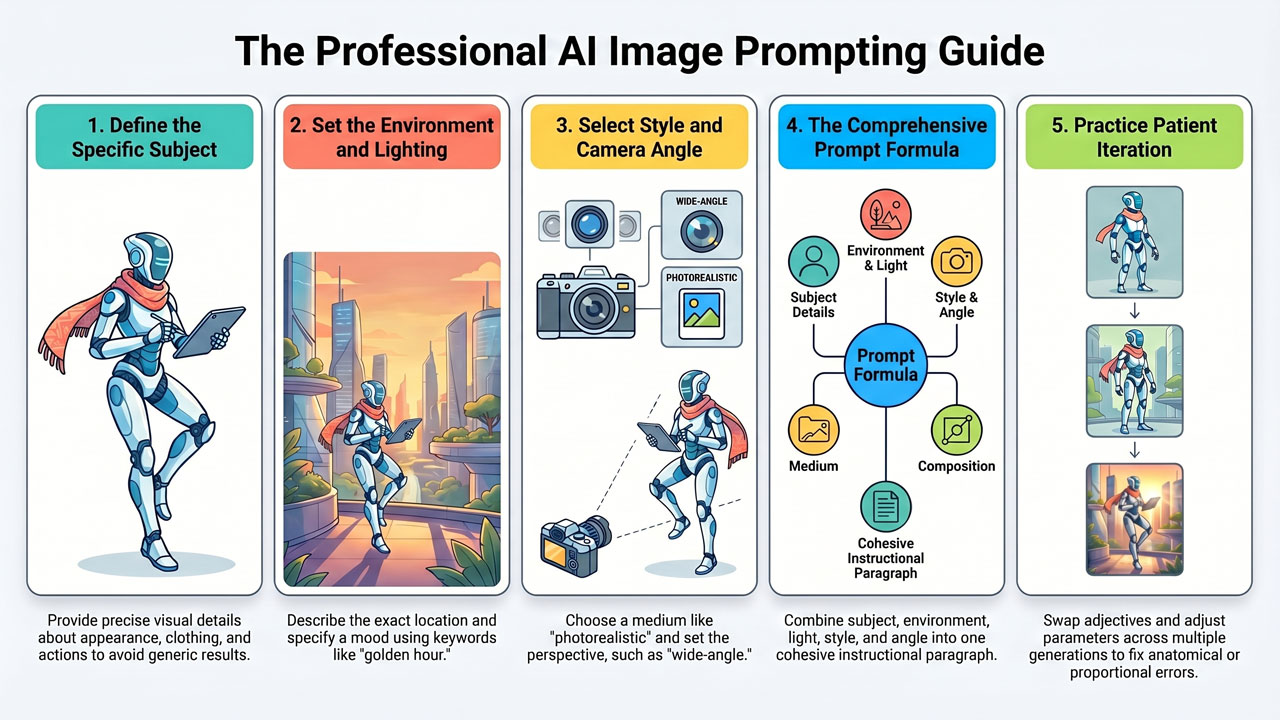
If you simply write “a dog” in an image tool, the AI will choose the most generic dog, in the most generic environment, with random lighting. To obtain good and useful images for your presentations, newsletters, or blog posts, you must act as a combination of a photographer and an art director. Here are the five most important parameters you should include in an image prompt:
-
The Main Subject (What is in focus?) Describe exactly what it is we are looking at. Do not be vague. Instead of “a woman working”, write “a young woman with short dark hair, dressed in a blue blazer, sitting and typing with concentration on a silver laptop”. The more visual details you provide about the subject, the more precise the result will be.
-
Environment and Background (Where are we?) Where does the scene take place? Is the background blurred or sharp? Instead of leaving it open, describe the location: “She is sitting in a bright, modern Scandinavian office with large windows and green plants in the background”.
-
Lighting (What is the mood?) Light is everything in photography and art. It sets the mood for the entire image. Specify what type of light you desire. Some good keywords to experiment with are: “soft morning light”, “dramatic lighting”, “neon light”, “studio light”, “cinematic light”, or “golden hour”.
-
Style and Medium (How is the image created?) The AI can mimic any art style whatsoever. You must tell it whether you want the image to look like a real photograph taken with an SLR camera, or something entirely different. You can use phrases such as: “photorealistic”, “hyperrealistic”, “watercolour painting”, “comic book style”, “3D rendered”, or “minimalist illustration”.
-
Camera Angle and Perspective (Where is the photographer standing?) Describe where the camera is positioned in relation to the subject. Use concepts such as “close-up”, “wide shot”, “bird’s-eye view” (seen from above), “worm’s-eye view” (seen from below), or “wide-angle”.
A good, comprehensive image prompt could therefore look like this: “A photorealistic portrait of a young woman in a blue blazer working with focus at a laptop. She is sitting in a bright, Scandinavian office with large windows and green plants in the background. Soft morning light falls across her face, cinematic style, shot from a wide camera angle with a shallow depth of field where the background is beautifully blurred.”
Remember that image generation almost always requires patience and iteration. You will rarely achieve the perfect image on the first attempt. The machine can sometimes misunderstand proportions or place a hand somewhat strangely. It is part of the process. Adjust your words, swap an adjective, add a light source, and press generate again until the image is exactly as it should be.